
The bill that arrives after the decision
Illustrative scenario: a composite of patterns common in cloud projects, not a named company.
A project to move a customer portal to the cloud is approved with a clear budget: a one-off migration cost and a monthly running cost of about $9,000. The first two invoices land close to plan. The third is $21,000.
Nobody did anything wrong, exactly. A load-testing environment built for one week was never switched off. A developer copied a large data set between regions to debug a problem, and the transfer was billed by the gigabyte. A new AI search feature went live in a pilot that turned out to be popular, and every query cost money. Each decision was reasonable when it was made. Together, they more than doubled the bill, and the project manager found out a month later, from finance.
That gap, between the moment money is committed and the moment someone who owns the budget sees it, is what FinOps exists to close. This article explains FinOps in plain terms and gives project managers a playbook they can use without becoming cloud engineers.
Why cloud costs catch project managers out
Traditional IT budgets work like a purchase. You approve a server, a licence or a data centre upgrade once, and the cost is known. The cloud works like a utility bill. Spending happens every hour, it is triggered by engineers rather than buyers, and it can change with every configuration setting and every user.
Three things make this hard for a project budget:
- Anyone can spend. Starting a server, storing data or calling an AI model needs no purchase order. Spending decisions are spread across the whole team.
- The bill is late. Most organizations see cloud costs in a monthly invoice or a finance report, weeks after the spending happened.
- The cost is OpEx, not CapEx. Moving to the cloud turns large one-off capital purchases into a running operating cost. That changes how finance treats it, and who has to explain the variance.
The waste is real. Flexera’s 2026 State of the Cloud Report, a survey of 753 cloud decision-makers, puts estimated wasted cloud spend at 29%, and says it rose for the first time in five years, driven by AI workloads and newer, more complex cloud services. Even organizations that take cost seriously are losing ground.
What FinOps is
The FinOps Foundation, part of the Linux Foundation, defines FinOps as “an operational framework and cultural practice which maximizes the business value of technology”, one that “creates financial accountability through collaboration between engineering, finance, and business teams”.
The important word is collaboration. FinOps is not a tool or a cost-cutting team. It is the habit of putting cost information in front of the people who make spending decisions, while they are making them. Two of the Foundation’s six principles say it directly: “Everyone takes ownership for their technology usage” and “Business value drives technology decisions”.
Three phases, repeated
The framework describes the work as a cycle:
- Inform: see what you are spending, and on what. Costs are allocated to teams, projects and products.
- Optimize: reduce waste and get better rates, without hurting what users need.
- Operate: make it routine, with budgets, alerts, reviews and owners.
Why project managers are well placed
FinOps is mostly practised by central teams: Flexera found that 63% of organizations now rely on a FinOps team. But those teams see costs by account and service. They rarely know which project a cost belongs to, what it was meant to achieve, or whether a spike is expected.
Project managers know exactly that. You already own a budget, a forecast and a status report, and you already run the meetings where engineering, finance and the business sit together. FinOps simply adds cloud cost to the things you track.
A FinOps playbook for project managers
1. Price the run rate, not just the project
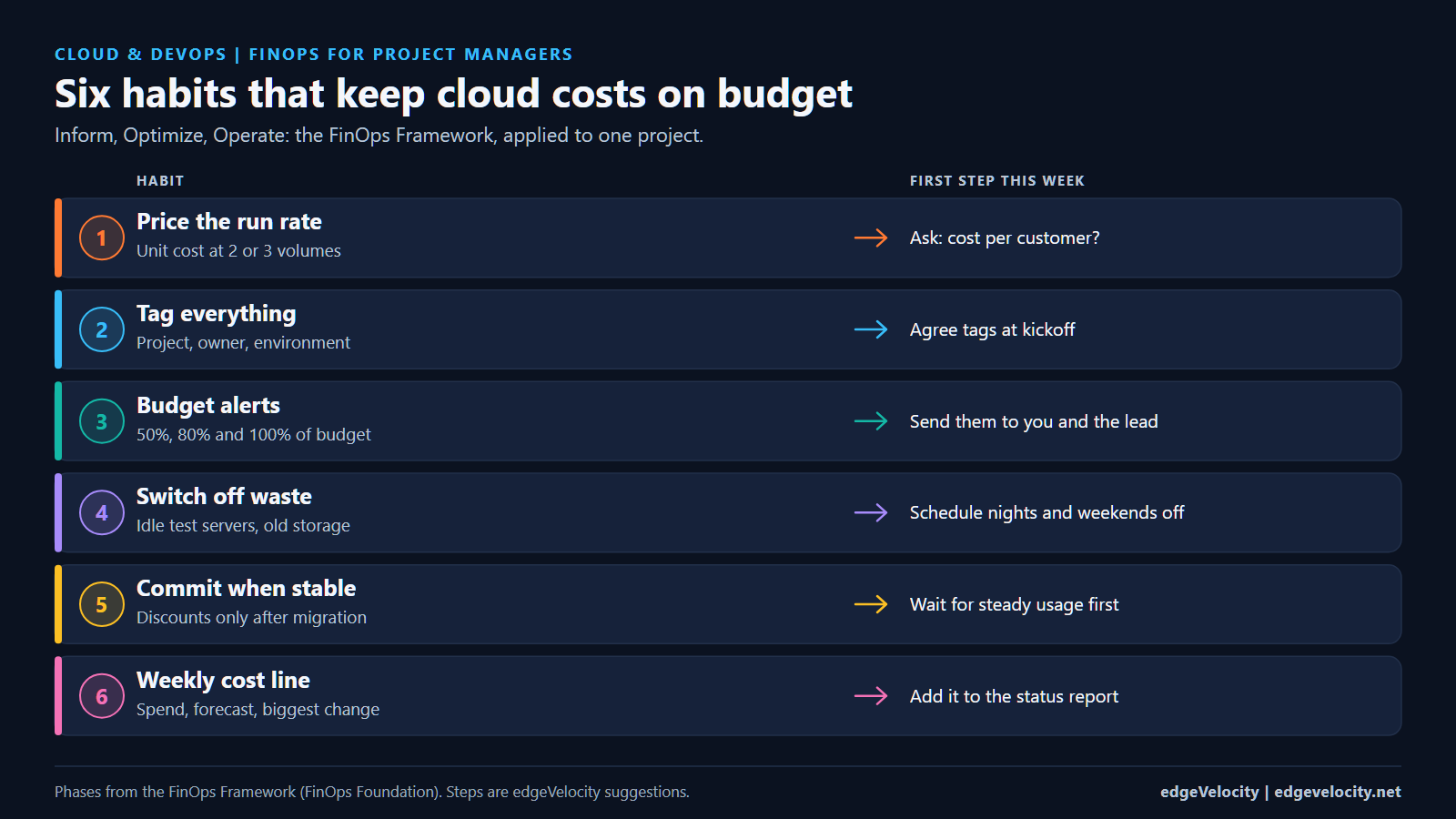
A business case that shows a migration cost and a single monthly figure hides the real risk. Ask for the running cost as a unit cost: cost per customer, per transaction, per report or per thousand AI queries. Then show what happens at two or three volumes. If the portal doubles its users, does the bill double, or does it jump?
2. Tag everything to the project from day one
Cloud resources can carry labels, called tags, such as project name, cost centre, environment and owner. Without them, your costs disappear into a shared bill and nobody can tell what belongs to whom. Agree the tags at kickoff, make them part of the definition of done, and ask for a weekly list of anything untagged.
3. Set budgets and alerts before you need them
Every major cloud provider can send an alert when spending reaches a share of a budget or is forecast to exceed it. Set alerts at 50%, 80% and 100% of the monthly project budget, sent to you and the technical lead. A surprise caught on day 9 is a conversation. Caught on day 40, it is a variance report.
4. Switch off what nobody is using
The most common waste is not exotic. It is test and development environments running nights and weekends, servers sized for a peak that never came, storage and snapshots left behind after a test, and data copied between regions or out of the cloud. Ask for non-production environments to run on a schedule, and add a “clean-up” task to every test and every sprint.
5. Commit only when usage is stable
Providers offer large discounts, often called reservations, savings plans or committed-use discounts, in exchange for committing to a level of usage for one or three years. They are worth having, but only once usage has settled. Committing during a migration, before you know the real shape of the workload, can lock in paying for capacity you no longer need.
6. Put cloud cost in the weekly status report
Add one line: spend to date, forecast to the end of the month, and the biggest change since last week with a reason. This is the single habit that closes the gap in our opening story. It turns cloud cost from a finance surprise into something the team discusses while it can still act.
AI changes the maths
AI features are now the fastest-moving part of many cloud bills. The FinOps Foundation’s State of FinOps 2026 survey, with 1,192 respondents representing more than $83 billion in annual cloud spend, found that 98% of FinOps teams now manage AI spend, up from 31% two years earlier, and that FinOps for AI is their top forward-looking priority.
AI costs behave differently from servers. Many AI services charge per use, often by the volume of text processed (tokens) or by the hour of specialised hardware, so a feature’s cost grows with every user and every question. A pilot that costs a few hundred dollars a month can cost many thousands once it is open to everyone.
For any AI feature in your project:
- Estimate the cost per use before launch and multiply it by realistic usage, not pilot usage.
- Agree a monthly ceiling and what happens if it is reached: a cheaper model, a usage limit or a decision meeting.
- Track cost per use after launch, alongside the value it delivers.
Where CapEx and OpEx come in
Cloud spending is usually an operating expense, but not all of it. Depending on your accounting rules and your finance team’s policy, some one-off implementation costs of a cloud project may be capitalised, while subscriptions and usage are expensed as they happen. The split matters: it changes which budget pays, how the project’s cost appears in the accounts, and what leaders see in quarterly results.
Agree the split with finance at the start, not at year-end. If you need a simple way to sort project costs into CapEx and OpEx and track them against budget, our CapGate Pro CapEx and OpEx tracker was built for exactly that. For a quick reminder of the difference, see our short CapEx vs OpEx video.
Cloud cost checkpoints by project phase
| Phase | Ask | Red flag |
|---|---|---|
| Business case | What is the unit cost, and what happens at 2x and 5x volume? | A single monthly figure with no volume assumption |
| Planning | Which tags, which budget alerts, who receives them? | “Finance will tell us if it’s high” |
| Build and test | Do non-production environments switch off at night? Who cleans up after tests? | Test environments running 24/7 with no owner |
| Go-live | What is the AI cost per use, and the monthly ceiling? | AI features costed on pilot usage only |
| First 90 days | Is usage stable enough to commit to discounts? | Three-year commitments signed during migration |
| Handover | Who owns the cloud budget after the project closes? | Nobody, so the costs drift for years |
Release discipline and cost discipline go together: the teams that ship in small, well-watched steps also spot cost spikes sooner. See what the 2025 DORA research says about delivery habits in AI-assisted teams, and our release-readiness checklist for your next go-live.
What to do on Monday
- Ask for last month’s cloud costs for your project. If nobody can produce them, tagging is your first task.
- Set budget alerts at 50%, 80% and 100% of your monthly cloud budget, sent to you and your technical lead.
- List every non-production environment and ask which ones can switch off at night and at weekends.
- For each AI feature, write down the cost per use and the monthly ceiling.
- Add a one-line cloud cost update to your weekly status report.
Frequently asked questions
Do I need a FinOps certification?
No. Certifications help people who run FinOps full-time. For a project manager, the six habits above cover most of what matters: visibility, ownership and a weekly review.
Isn’t cloud cost the engineers’ job?
Engineers make most spending decisions, so they must be involved. But the budget, the forecast and the business case are yours. FinOps works when both sides see the same numbers.
Should we just cut cloud spend?
Not by itself. The goal is value, not the lowest bill. A cost that grows because more customers use the product can be good news. A cost that grows because nobody switched a server off is not.
We use more than one cloud. Does this still work?
Yes. The habits are the same on every provider. Agree one set of tags and one weekly report that combines them, so nobody has to compare different bills by hand.
Sources
- FinOps Foundation, FinOps Framework: definition, principles and the Inform, Optimize and Operate phases.
- FinOps Foundation, State of FinOps 2026, and its press release (February 19, 2026).
- Flexera, 2026 State of the Cloud Report (March 18, 2026).