

One login, many victims
On July 12, 2024, AT&T told the US Securities and Exchange Commission that criminals had downloaded records of calls and texts for nearly all of its wireless customers, about 110 million people, covering six months of 2022. The records showed which numbers called which, and how often. They did not include the content of calls or texts.
The data had not been taken from AT&T’s own network. It was taken from AT&T’s workspace on Snowflake, a cloud data platform. AT&T was one of about 165 Snowflake customers that investigators notified that spring and summer. Ticketmaster, Santander and Advance Auto Parts were among the others named in public reporting.
The way in was almost boring. Google’s Mandiant team, which investigated the campaign, found that the attackers used usernames and passwords stolen by “infostealer” malware, some of it from contractor laptops that were also used for gaming and pirated downloads. The accounts had no multi-factor authentication. Some passwords had not been changed in four years. In August 2026, a Canadian man, Connor Moucka, pleaded guilty in US federal court to charges tied to the campaign. Prosecutors said at least 165 companies were affected and about US$2.5 million in ransom was collected.
This article is about the lesson behind that headline: your data is only as safe as the weakest account that can reach it, including accounts that belong to people who don’t work for you. It ends with a checklist you can use on your own suppliers this week.
Why third parties are now the fastest-growing risk
Verizon’s 2025 Data Breach Investigations Report, which analyzed 12,195 confirmed breaches, found a third party involved in 30% of them, double the year before. “Third party” covers a lot of ground: a software platform that holds your data, a contractor with remote access, an integration that moves data between systems, or a supplier whose own breach exposes yours.
Three things have pushed that number up:
- More of your data lives on other people’s platforms. Cloud data warehouses, software-as-a-service tools and file-sharing services each hold a slice of your business.
- More people outside the company can log in. Contractors, consultants, offshore teams and vendor support staff often have access as broad as an employee’s, without the same controls on their laptops.
- Security is set per customer, not per platform. Snowflake offered multi-factor authentication. The affected customers had not required it. On most cloud platforms, the safest settings are available but not switched on by default.
That last point is the one leaders most often miss. “The vendor is secure” and “our use of the vendor is secure” are different statements. The Snowflake campaign happened entirely in the gap between them.
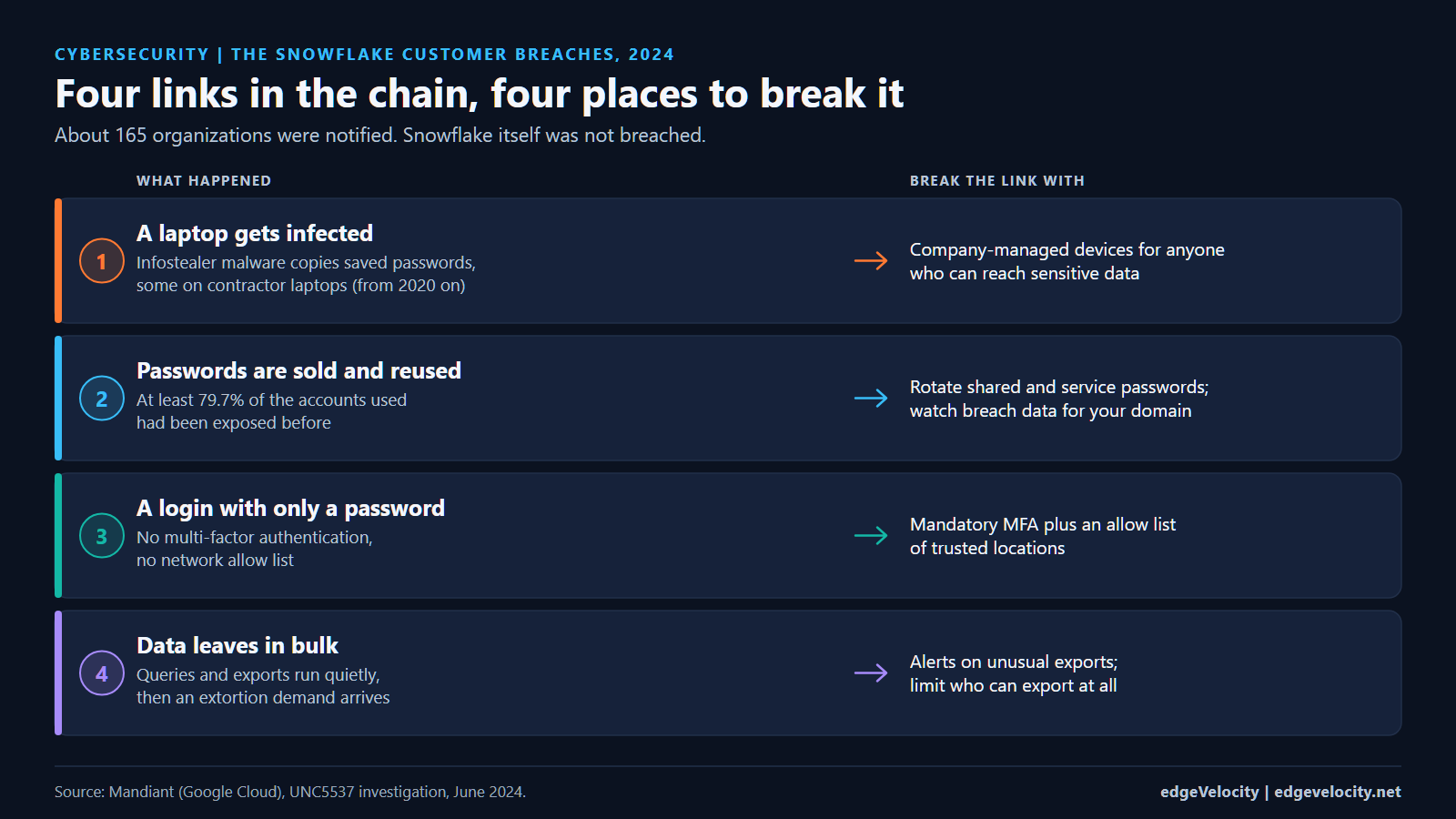
The chain, and where it could have been broken
Walk through the chain as Mandiant described it and you can see that it needed four things to go wrong, and that any single control would have stopped it.
- A laptop gets infected. Infostealer malware copies saved passwords from the browser. Some infections Mandiant traced dated back to 2020. Break it with: company-managed devices for anyone who can reach sensitive data, contractors included, and endpoint protection on those devices.
- The passwords are sold or shared. Stolen credentials circulate on criminal forums for years. Mandiant found at least 79.7% of the accounts used in the campaign had been exposed before. Break it with: regular password rotation for service and shared accounts, and monitoring for your company’s domains in breach data.
- Someone logs in with just a password. No second factor, no restriction on where the login can come from. Break it with: mandatory multi-factor authentication, plus a network allow list so logins only work from trusted locations.
- Large amounts of data leave quietly. The attackers ran queries and exported data in bulk. Break it with: alerts on unusual queries or export volumes, and limits on who can export at all.
None of these controls is exotic or expensive. The problem is that each one belongs to a different owner: IT owns the laptops, the security team owns monitoring, the platform administrator owns MFA settings, and the business owns who gets access. When a contractor or vendor is involved, there is often no owner at all.
A worked example: the vendor you forgot you had
Illustrative scenario: a composite of patterns common in mid-sized organizations, not a named company.
A distribution company with 400 staff hires an analytics consultancy to build sales dashboards. The consultancy’s three analysts get logins to the company’s cloud data warehouse, with read access to all sales and customer tables “to save time”. The project finishes in nine months. The dashboards are a success. The consultancy keeps a support contract, so nobody removes the logins.
Two years later, one analyst has left the consultancy, but her account still works, because the consultancy never told the client and the client never asked. Her old personal laptop, which she occasionally used for work, was infected long ago. Her password is in a criminal dataset. The warehouse allows password-only logins because “the vendor said MFA would break the scheduled reports”.
Nobody in that story did anything unusual. That is the point. Third-party risk is rarely one bad decision. It is a series of reasonable shortcuts that nobody revisits.
The third-party access checklist
Use this on your top ten suppliers by access, not by spend. A cheap supplier with an administrator login is a bigger risk than an expensive one with none.
| Check | Good answer | Red flag |
|---|---|---|
| Who exactly can log in? | A named list of individuals, reviewed in the last 90 days | “Their team”, shared accounts, or nobody knows |
| Is multi-factor authentication required? | Enforced by your platform settings, not just recommended | Optional, or turned off for “service” reasons |
| What can they reach? | Only the systems and data their work needs | Broad read access “to save time” |
| From where? | Company-managed devices, or a restricted network allow list | Any device, any location |
| Until when? | An end date on every account, tied to the contract | No expiry; accounts outlive the project |
| What happens when someone leaves the supplier? | Contract requires notice within 24 to 48 hours | No clause; you find out by accident |
| Would you notice misuse? | Alerts on unusual logins and bulk exports | Logs exist but nobody looks |
| What happens if they are breached? | Contract requires notification within a set number of hours | “Promptly”, or nothing in writing |
Two answers on this list are contract terms, not technology. That is deliberate: the cheapest time to fix third-party risk is before the contract is signed, when you still have leverage.
Where project managers come in
Most vendor access is created by projects. A system implementation brings in an integrator. A data migration needs a contractor with broad access. A pilot onboards a new software platform before procurement and security have reviewed it. When the project closes, the access usually stays.
Three habits close most of that gap:
- Put vendor access in the RAID log as a tracked item with an owner and an end date, the same way you track a dependency.
- Make “vendor accounts removed or handed over” a closure criterion. A project isn’t closed while a contractor can still log in.
- Ask the MFA question at design, not go-live. “Will this integration work with multi-factor authentication on?” is a design decision. Discovering at cutover that it won’t is how exceptions become permanent.
Our guide to what actually stops breaches covers the other four common entry points, and the PMO governance guide shows how to build gate criteria like these into a project from day one.
What to do this week
- List your ten suppliers with the broadest access to your systems or data.
- For each, run the eight checks in the table above. Score each check green, amber or red.
- Fix every red multi-factor answer first. It is the single control that would have stopped the Snowflake campaign.
- Add an expiry date to every vendor account that doesn’t have one.
- Send your legal or procurement team two clauses for the next contract renewal: staff-departure notice and breach notification within set hours.
Frequently asked questions
Was Snowflake itself hacked?
No. Mandiant found no evidence that Snowflake’s own systems were breached. Every incident it investigated traced back to stolen customer credentials on accounts without multi-factor authentication.
Isn’t third-party risk the vendor’s problem?
Partly. The vendor secures its platform. You decide who can log in, from where, and with what protection. Regulators and customers will hold you responsible for your data either way.
We have hundreds of suppliers. Where do we start?
Rank them by access, not by spend: who can log in, and to what. Ten suppliers usually account for most of the real exposure.
Do security questionnaires help?
They help at selection, but they describe the vendor’s controls, not how your accounts are set up. The checklist above checks your side, which is where the Snowflake breaches happened.
Sources
- Mandiant (Google Cloud), UNC5537 targets Snowflake customer instances for data theft and extortion (June 2024).
- TechCrunch, AT&T says criminals stole phone records of “nearly all” customers (July 12, 2024), reporting AT&T’s SEC filing.
- The Record, guilty plea in the Snowflake hacking campaign (August 2026).
- Verizon, 2025 Data Breach Investigations Report.