

Built for the Future, Built for the edge
Google Sheets + Apps Script (no installs, no subscription)
The Advanced Project Planner: Enterprise PM Control Without the Bloated SaaS Cost.
Built for Project Managers, PMO leads, and delivery teams across IT, Telco, Finance, and Manufacturing who need robust structure instantly.
Runs entirely in Google Sheets with a custom Apps Script HTML frontend — no external installations or monthly subscription fees.
Regular price $35 CAD Sale price $24.50 CAD 30% off until Oct 28 — one-time purchase
Prefer Etsy? Buy on Etsy (opens in a new tab)
Not ready to buy? Try the free Project Health Command Center first
Quick-Start Setup Guide
No spreadsheet or coding skills needed — most buyers are up and running in about five minutes.
Make Your Copy
Open the private template link and click File → Make a copy directly into your Google Drive.
One-Time Setup
Run Project Planner → Finish Setup (One-Time) from the custom top menu to activate checkboxes, protect formula cells, and apply branding.
Seeing "Google hasn't verified this app"? That's normal for a private template — click Advanced → Go to Advanced Project Planner → Allow. Safe and local to your account.
Configure Your Setup
Enter your business name, tagline, and team roster on the Setup tab to auto-populate team dropdowns.
Enable Automation (Optional)
Turn on automated daily reminder emails, weekly digests, and recurring task triggers with a single click.
Interactive Mockup Tour
Every tab, straight from the planner — this is exactly what opens in your own Google Drive.
Mockup 1
Executive Dashboard
Live KPIs, workload overview, budget health, and 5 automated charts — the first thing you and your team see.
Mockup 2
Projects Hub
Your master project list with auto-calculating budget spent, variance, % complete, and a strict On Track / At Risk / Off Track health status.
Mockup 3 & 4
Tasks & Recurrence
A full work breakdown structure with owner dropdowns scoped to each project's own team, custom statuses, and automatic recurring task generation.
Mockup 5
Budget Tracker
Line-item planned vs. actual spend per project, with automatic overspend warnings the moment a category runs hot.
Mockup 6
RAID Risk Log
Comprehensive tracking for Risks, Assumptions, Issues, and Dependencies, with automated 1–9 severity scoring.
Mockup 7
Gantt Chart
A full year-round calendar timeline of every task, color-coded by status, with a live "Today" marker.
Mockup 8
Kanban Board
Every task sorted into Not Started, In Progress, Delayed, and Completed columns — drag a card to update it.
Mockup 9
Priority Matrix
An Eisenhower priority grid that separates Do-First work from what should be scheduled or delegated.
Mockup 10
Client View
A safe, client-facing view that hides internal notes and shows only the tasks and RAID items you mark client-visible.
Mockup 11
PDF Reports
A one-click, print-to-PDF executive summary report for any project — budget, schedule, and risk, ready to send.
Mockup 12
Three App Themes
Switch the Dashboard App between Midnight, Cream and Sepia themes, and white-label it with your own business name, tagline and logo.
Key Features & Architecture
Everything runs inside your own private Google account. No external installations, no data harvesting, and no third-party servers required.
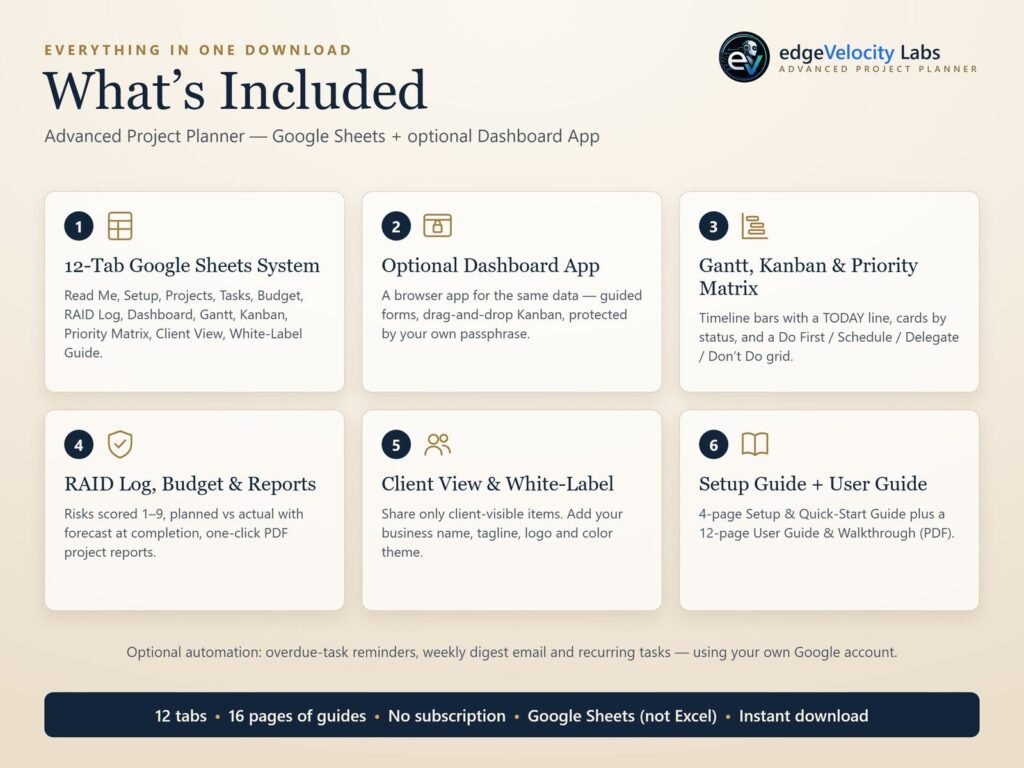
Live executive dashboard with 5 automated charts
RAID risk log with automated 1-9 severity scoring
Full-year Gantt chart with a live Today marker
Kanban board and Eisenhower priority matrix
Client-safe view plus one-click PDF reports
Optional automated reminder emails and weekly digest
Private by design
The script only ever runs inside your own Google Drive copy — nothing leaves your account.
No subscriptions
One-time purchase. No SaaS login, no monthly fee, no seat limits.