
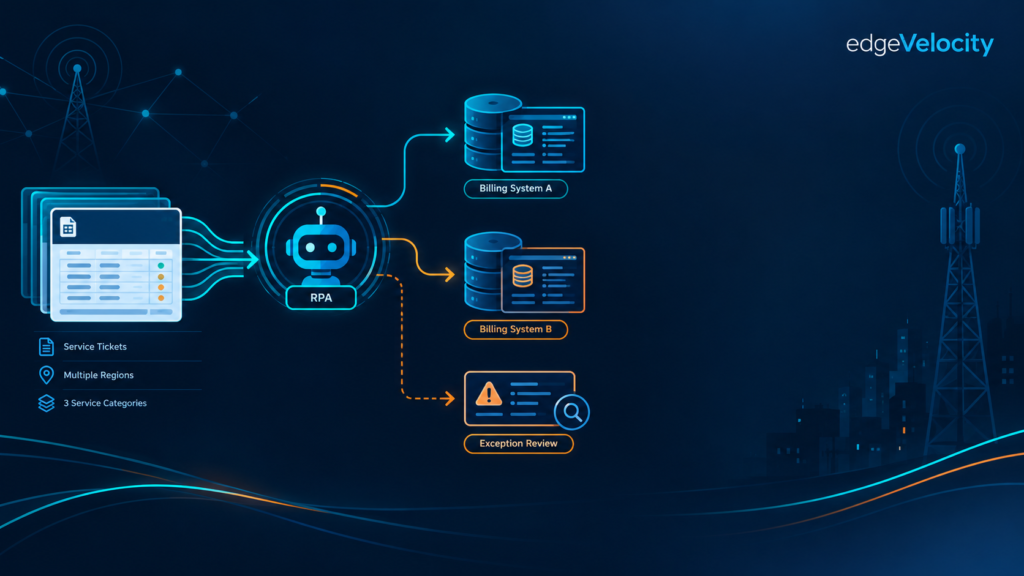
Every telecom carrier with enterprise contracts runs the same operation every month: a technician visits a customer site, does the work, and somebody has to turn that visit into an invoice line. Multiply that by a few hundred site visits a month, across multiple service types and multiple backend billing systems, and you have a billing operation that looks simple on a whiteboard and is genuinely painful in practice.
This is a real case study — the numbers, the process, and the outcomes are drawn directly from an RPA (Robotic Process Automation) implementation delivered inside a large telecom carrier’s enterprise billing operation. The employer and the specific internal systems involved are withheld here; the mechanics, the volumes, and the results are not.
The billing problem hiding inside every truck roll
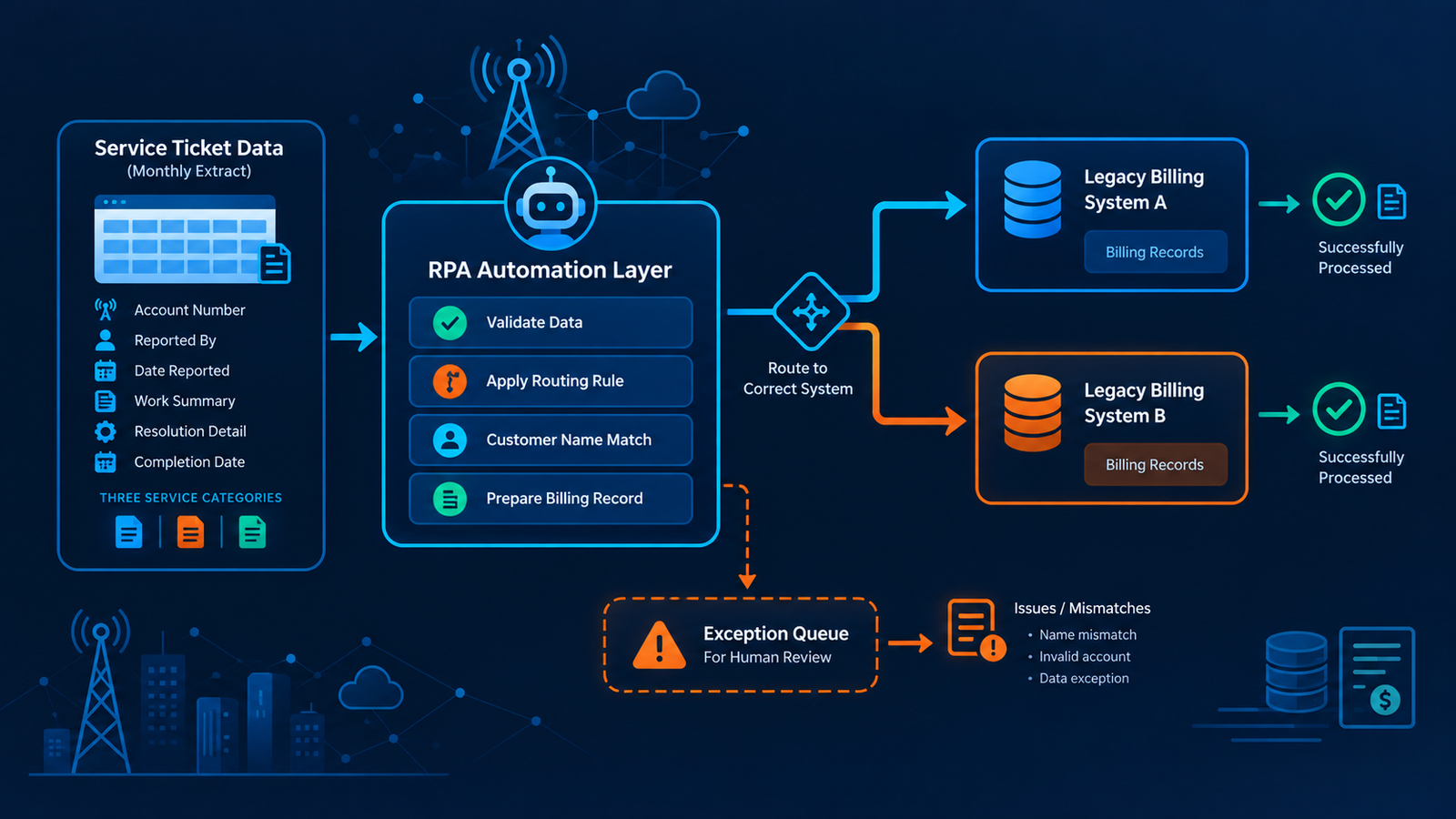
The setup: a technician completes an on-site service visit — a “truck roll” — for an enterprise customer. That visit needs to be billed. Once a month, the operations team receives a finalized spreadsheet extract from the field-service environment, organized across three separate categories of service ticket. Each eligible record in that file has to become an actual billing transaction inside one of two separate backend billing systems, and which system a given customer account belongs to is determined by the format of its billing account number — a routing rule with no exceptions and no room for guessing.
That’s the whole job on paper: read the file, pull the right fields, put the charge into the right system. In practice, someone was doing all of it by hand, every month, for every eligible ticket.
What the manual process actually looked like
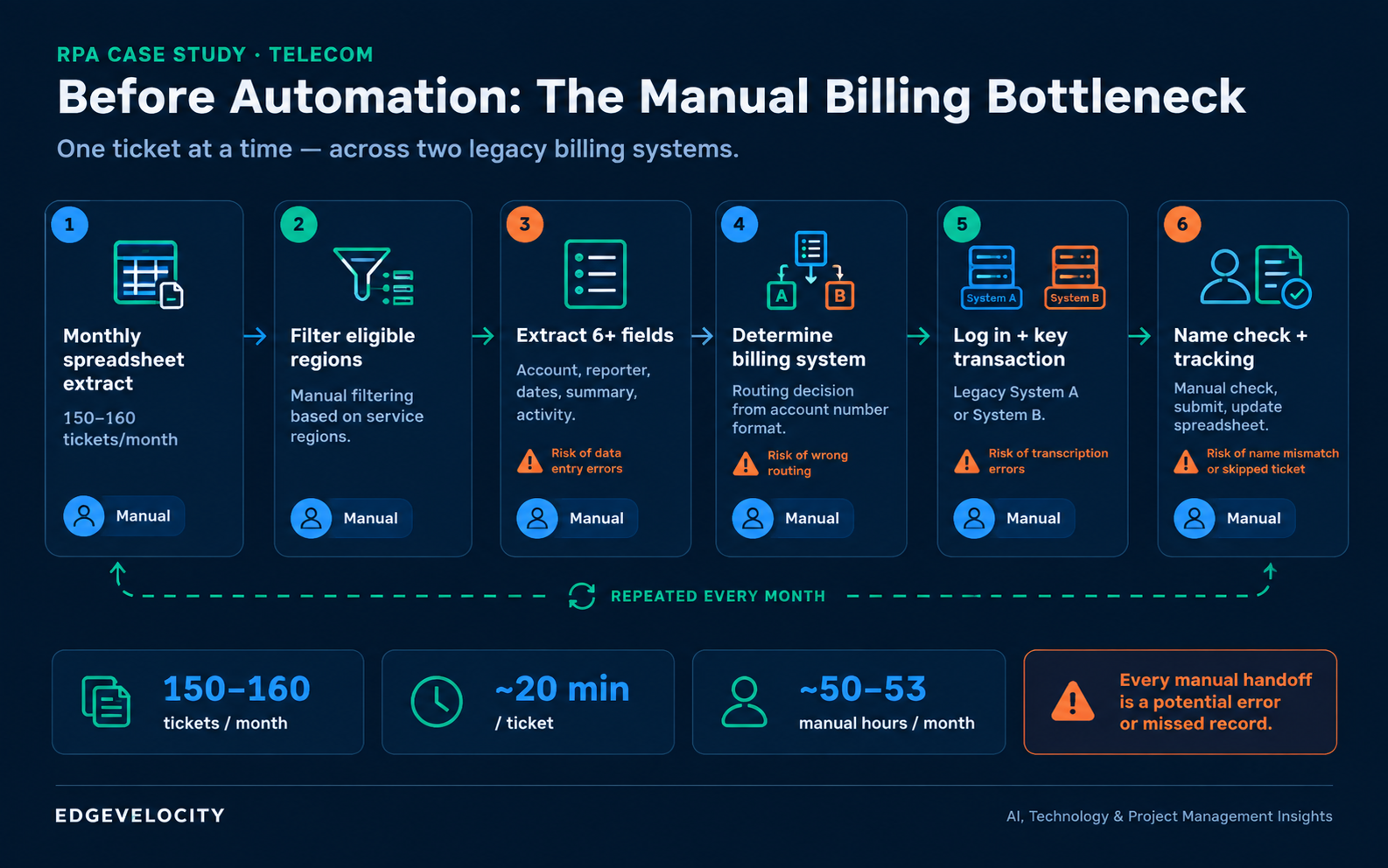
Before automation, a person opened the monthly file, manually filtered it down to the service regions that were actually billable, and then — ticket by ticket — extracted six or more data fields: the account number, who reported the ticket, the date it was reported, a summary of the work, the activity/resolution detail, and the completion date. For every single ticket, that person then had to determine which of the two billing systems the account belonged to, log into that system, manually key the transaction in, and — for one of the two systems — manually check that the customer name on the ticket actually matched the name on file before submitting anything.
Documented volume on this workload: roughly 150 to 160 tickets a month, at a measured average handling time of 20 minutes per ticket. That’s somewhere between 50 and 53 hours of manual, repetitive data entry every single month — not counting the time lost to correcting mistakes, chasing down tickets that fell through the cracks, or reconciling a tracking spreadsheet that had to be updated by hand after every transaction.
Why this is a bigger problem than it looks
Twenty minutes a ticket doesn’t sound like much until you price in what that twenty minutes actually contains: a human transcribing structured data into two different legacy system interfaces, applying a routing rule from memory, eyeballing a name match, and self-reporting whether it worked. Every one of those steps is a place where a tired or rushed employee introduces an error — a wrong account, a skipped ticket, a name mismatch that gets waved through instead of flagged.
In a billing operation, that’s not a minor quality issue. An incorrectly billed (or unbilled) enterprise account is a revenue leakage problem, a customer trust problem, and — because enterprise telecom billing is subject to audit — a compliance problem. And because the volume is steady and recurring rather than a one-time spike, the exposure compounds every month it isn’t fixed. This is precisely the kind of workload RPA is built for: high-volume, highly repetitive, rules-based, and running against systems that don’t (or can’t, for cost or timeline reasons) talk to each other directly.
The automation: how the bot actually works
The solution replaced the manual workflow with a single automated run, triggered on the monthly billing schedule, structured in six stages.
1. Trigger and ingest. The bot activates on schedule and pulls the finalized billing extract — no one has to remember to kick it off or hand it to anyone.
2. Parse, filter, extract. It reads all three ticket-category tabs in the file, filters out anything outside the eligible service regions, and then pulls the same structured fields a human used to type by hand: account number, ticket reporter, reported date, summary, activity detail, and completion date.
3. Validate and route. This is the core control point. The bot checks the format and length of the account number and automatically routes the record to the correct billing system based on that rule — the same routing logic a person used to apply from memory, now applied identically, every time, with zero drift. Anything that doesn’t pass validation is flagged as an exception rather than pushed through anyway.
4. Process across both billing systems. For each system, the bot logs in, enters the transaction, and submits it. On the system that requires a name match, it runs an automated comparison between the ticket’s customer name and the system’s billing name — normalized for case, spacing, and formatting differences — before submitting. A mismatch stops that record and routes it to manual review instead of billing on a guess. This is worth pausing on: the control that used to depend on a human noticing a discrepancy is now a deterministic check that never gets tired and never skips a record because the queue is long.
5. Handle exceptions without stopping the batch. A single bad record — an invalid account number, a failed name match, a system error — gets logged with a specific reason and set aside. The bot keeps processing every other valid record in the batch. Nothing brings the whole run to a halt.
6. Report, audit, and close the loop. Every processed record updates a completion-tracking log automatically — status, completion date, and who (or what) processed it. At the end of the run, the bot generates two outputs automatically: a completion report and a separate exception (“kick-out”) report listing anything that needs a human to look at it, and emails both to the accountable team. Full execution logs are retained for audit purposes.
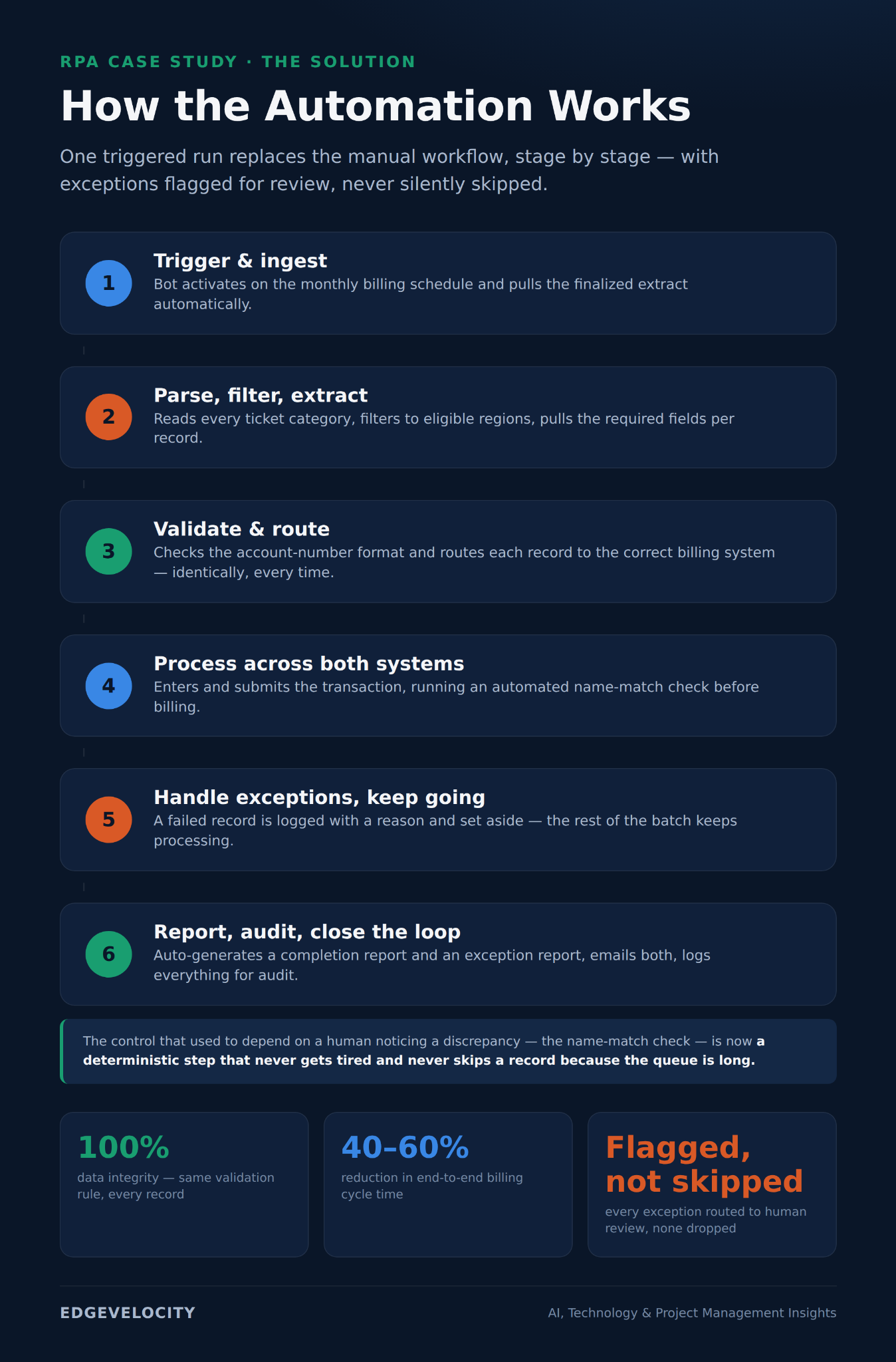
The result is a process where a person’s involvement moves from “manually execute every transaction” to “review the short exception list the bot couldn’t resolve on its own” — which is a fundamentally different, and much smaller, job.
The results, in numbers
Data integrity
Billing cycle-time reduction
Manual effort reallocated
Audit trail & compliance
100% data integrity. Every record now passes through the same validation and routing rules every time, eliminating the transcription and judgment errors that come with manual keying across two systems.
40-60% reduction in cycle time. Replacing ~50 hours a month of serial, one-ticket-at-a-time manual processing with a single automated run — even accounting for the exceptions that still need human review — cuts the time from “file received” to “billing complete” dramatically.
Full audit trail and regulatory compliance. Every transaction, success or failure, is logged with a reason and a timestamp, which is exactly what an audit or compliance review asks for and exactly what a manually updated spreadsheet struggles to guarantee.
Reduced risk exposure. Because failures are explicitly flagged rather than silently skipped or force-processed, the automation reduces the chance of an incorrect or missed billing event reaching a customer account.
Reallocated labor. Roughly 50 hours a month of clerical/operations time that was going into repetitive data entry became available for higher-value work — and rather than treat that as a headcount story, the rollout paired the automation with change-management workshops and self-service validation dashboards so operations staff could see and trust what the bot was doing, not just be told to stop doing the manual version.
What this means beyond telecom billing
The specific systems here were telecom billing platforms, but the pattern is not telecom-specific. Any enterprise process with high, steady transaction volume; a small number of clear, rules-based decision points (route based on a value, validate based on a match); and two or more systems of record that don’t natively talk to each other is a strong candidate for exactly this kind of automation. The parts worth stealing for a different process entirely are the two design choices that made this implementation trustworthy rather than just fast: routing and validation logic that’s applied identically every time instead of from memory, and exceptions that get flagged and queued for a human rather than silently dropped or forced through.
That second point is the one organizations get wrong most often when they automate a workflow that has compliance or financial consequences. The goal isn’t zero human involvement — it’s making sure the only work left for a human is the work that actually needs judgment.
The takeaway for enterprise and PM leaders
If you’re evaluating where RPA earns its keep in your own organization, this is close to the ideal profile: a recurring, high-volume, multi-system, rules-based process where the manual version is measured in tens of hours a month, not minutes. The math here is straightforward — roughly 50 hours a month of manual effort, a 40-60% cycle-time reduction, and a move from error-prone manual keying to 100% rules-consistent processing, without removing human oversight from the parts of the process where it still matters. That combination — speed, consistency, and a real audit trail — is what turns an automation project from a cost-cutting exercise into a genuine risk-management and governance improvement.
About the author
I’m Pankaj Nalavade (PMP, CSM, MBA), an AI Program and Delivery Manager with 20+ years leading technology transformation programs, and the founder of EdgeVelocity. I help enterprises and mid-market organizations turn AI pilots and automation programs into governed, adopted, ROI-positive results — not just proofs of concept.